
How to Make Sublimation Shirts: Step-by-Step Tutorial (Settings + Sizing Chart)
You don’t need a print shop to start making sublimation shirts at home. You need a polyester blank, a mirrored transfer, and about sixty seconds at the right temperature. Get those three right and the design becomes part of the fabric, permanently.
This tutorial covers the whole workflow: the equipment list, a press settings chart, a print-size table running Youth S to Adult 3XL, and the five mistakes that ruin most first attempts. By the end, you’ll press a shirt that survives every wash it will ever see.
How to Sublimation T Shirts: The Full Process at a Glance
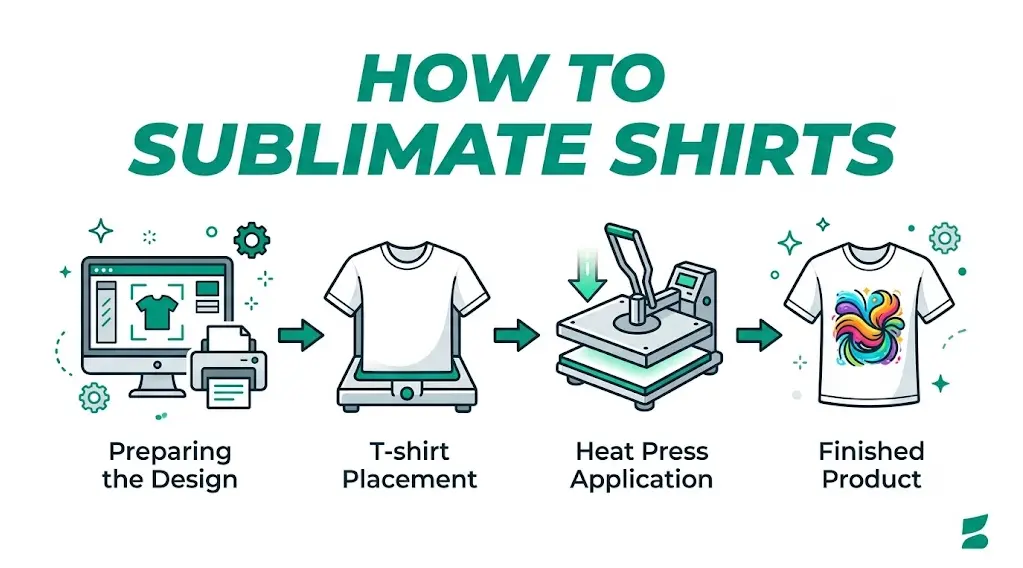
The short version first. Sublimation moves a design from paper into fabric using heat. Solid dye turns straight into gas at roughly 400°F, and polyester fibers open up and absorb it. Seven steps cover the entire job:
- Build the design at 300 DPI and mirror it
- Print onto coated sublimation paper with dye-sub ink
- Lint-roll the blank, then pre-press it for 3–5 seconds
- Tape the transfer face down on the shirt
- Press at 385–400°F for 45–60 seconds, medium pressure
- Peel the paper hot, in one smooth motion
- Let the shirt cool flat, then wash cold and inside out
Every step gets its own section below, with exact numbers. Skim the tables if you’ve pressed before. Read everything if this is shirt number one, most ruined blanks trace back to a skipped detail, not bad equipment.
What Is Sublimation on Shirts?
Sublimation is the physics term for a solid turning directly into gas, skipping the liquid stage. In apparel, dye-sub ink printed on coated paper vaporizes under heat, penetrates the opened polyester fibers, and locks inside as the fabric cools.
The image is dyed in, not stuck on. That’s why sublimated designs never crack or pee, there’s no layer to fail. It’s also why the method is picky: the dye bonds only with polymer fibers, and it’s translucent, so it only shows on light fabric.
Rule of thumb: if the shirt is at least 65% polyester and lighter than the ink you’re printing, it will sublimate. A white 100% polyester blank gives you the full-color result you see in catalogs.
Equipment You’ll Need (and What It Costs)
A working setup runs $600–2,500 depending on printer and press quality. Here’s the complete shopping list:
- Sublimation printer: a dedicated unit like the Epson SureColor F170, or a converted EcoTank. Budget $300–600. Once converted, an EcoTank can’t go back to regular ink.
- Dye-sub ink and transfer paper: consumables land around $0.30–0.80 per A4 transfer, which is why this method scales so cheaply.
- Heat press: a clamshell or swing-away, 15×15 inches minimum, $150–500. A home iron can’t hold 400°F evenly across a design and will waste blanks.
- Accessories: heat-resistant tape, uncoated butcher paper, a lint roller, and heat gloves. Under $40 total, and every item earns its keep.
- Blanks: light-colored, high-polyester shirts at $3–6 each wholesale. Buy extras, you will misprint a few while learning.
Picking a Sublimation Printer Shirt Sellers Actually Use
Skip the bargain conversion kits on marketplaces. A factory dye-sub unit ships with the correct ICC profile, the file that controls how on-screen colors translate to pressed colors. Converted EcoTanks work fine, but you’ll install a third-party profile and burn a few test prints dialing colors in.
One habit protects either machine: print something every two or three days. Dye-sub ink clogs idle print heads, and a clogged head is the most common $400 mistake in this craft.
Choosing the Blank: The Polyester Rules
Fabric decides everything. The dye bonds only with polyester, so poly content sets your color intensity:
- 100% polyester: full vibrancy, catalog-grade color. The standard for anything you plan to sell.
- 65–85% poly blends: noticeably softer color with a slight fade. Usable, and some sellers like the look.
- 50/50 blends: a deliberate vintage, washed-out effect. A style choice, not a defect, but know you’re choosing it.
- Cotton: don’t. The print looks fine off the press and washes out within a handful of cycles.
Color matters just as much. There’s no white ink in this process, the dye is translucent, so the shirt itself supplies the white. White and pastel blanks work beautifully; anything darker than your design swallows it whole.
Brand-wise, decorators lean on 100% poly lines like Gildan Performance, Sport-Tek PosiCharge, and JERZEES Dri-Power. Spun-polyester versions feel like cotton but print like poly, worth the extra dollar.
Design Prep: Mirroring, 300 DPI, and ICC Profiles
Three file settings separate crisp prints from mush:
- Mirror everything. The paper goes face down, so the design must print flipped horizontally. Un-mirrored text is the classic first-timer heartbreak.
- Work at 300 DPI at final print size. A small logo stretched to 11 inches prints blurry. Build the file at the dimensions you’ll actually press.
- Design in RGB with the right ICC profile. Dye colors shift under heat; the profile compensates. Without it, reds press orange and grays go green.
At print time, load the bright, coated side of the paper and switch off high-speed mode in the driver. Slower passes lay ink down evenly, and even ink is what turns into even color.
Unsure how a palette will press? Print a small swatch strip and press it on a fabric scrap or a hidden hem. Thirty seconds of testing beats guessing with a full sheet of ink.
Sublimation Sizes for Shirts: The Print-Width Chart
Sizing trips up more beginners than temperature does. A design that fills an Adult XL drowns a Youth S. The fix is simple: scale print width to the garment and keep the top of the design 2–4 inches below the collar.
| Garment size | Recommended print width | Top of design below collar |
| Youth S | 6.5–7 in | 2–2.5 in |
| Youth M | 7–7.5 in | 2.5 in |
| Youth L | 7.5–8.5 in | 2.5–3 in |
| Adult S | 8.5–9 in | 3 in |
| Adult M | 9–10 in | 3–3.5 in |
| Adult L | 10–10.5 in | 3.5 in |
| Adult XL | 10.5–11 in | 3.5–4 in |
| Adult 2XL | 11–11.5 in | 4 in |
| Adult 3XL | 11.5–12 in | 4 in |
For left-chest logos, 3.5–4 inches wide suits adult sizes; drop to about 3 inches for youth. Scaling an adult design down 20% usually lands youth sizes in the right zone. Back prints sit roughly 4 inches below the collar, centered between the seams.
Pro tip: cut a piece of paper to your print size and lay it on the actual shirt before pressing. Thirty seconds of checking beats a ruined blank every single time.
Press Settings That Actually Work
These numbers cover standard 100% polyester tees. Blends press at the same temperature; just expect softer results.
| Setting | Value | Why it matters |
| Temperature | 385–400°F | Below 385°F the dye never fully gasses out; prints look faded |
| Time | 45–60 seconds | Too short means weak color; too long scorches the poly |
| Pressure | Medium (about 40 psi) | Firm, even contact drives the gas into the fibers |
| Pre-press | 3–5 seconds | Flattens wrinkles and evaporates trapped moisture |
| Peel | Hot, one motion | A slow drag smears into a ghosted double image |
When your paper manufacturer publishes its own numbers, follow them, coatings vary slightly between brands, and the paper maker tested theirs.
Sublimation Shirt How To: The 7 Steps, Start to Finish
Step 1: Print the transfer. Load the coated side, print mirrored at 300 DPI, and let the sheet dry a few minutes. Handle it by the edges; fingerprints transfer too.
Step 2: Prep the blank. Lint-roll the entire print area. Every stray fiber becomes a permanent colored speck once heated.
Step 3: Pre-press for 3–5 seconds. This flattens the fabric and drives off moisture that would otherwise blur your edges. Never skip it in humid weather.
Step 4: Position and tape. Place the transfer face down, aligned to the sizing chart above. Tape all four corners with heat tape — a shift of 1/16 inch mid-press means ghosting.
Step 5: Add protection paper. Slide butcher paper inside the shirt to stop bleed-through, and lay a sheet on top to protect the platen from stray ink.
Step 6: Press. 385–400°F, 45–60 seconds, medium pressure. Don’t peek — lifting the press early kills the transfer and there’s no second chance.
Step 7: Peel hot, cool flat. Lift the press straight up, peel the paper immediately in one smooth motion, and leave the shirt untouched while it cools. The fibers close as they cool, locking the dye in for good.
5 Common Mistakes That Ruin Shirts
- Forgetting to mirror. Backward text, no fix. Make mirroring part of your print-dialog checklist.
- Skipping the lint roll. Dust and fibers press into permanent specks you’ll spot from across the room.
- Ghosting. The paper shifted during pressing or peeling. Tape every corner and peel in one motion.
- The wrong blank. Low poly content or dark fabric equals a faded or invisible print. Check the sewn-in label, not the product listing.
- Moisture. Humid blanks steam under the press and blur edges. The 3–5 second pre-press exists for exactly this reason.
Expect to sacrifice a few shirts while learning. Even professionals budget 5–10% of their blanks to misprints in the first months: build that into your costs instead of pretending it won’t happen.
Washing and Care Instructions
The print itself is permanent, but the polyester still appreciates gentle handling:
- Wash cold, inside out, with like colors
- Skip bleach and fabric softener: both attack polymer fibers over time
- Tumble dry low or hang dry
- Iron on low only, and never directly over the design: high heat can reactivate the dye
Follow that and the design outlives the garment. There’s no film to crack and no ink layer to fade. The color literally is the fiber.
Skip the DIY: When Ordering in Bulk Beats Printing Yourself
DIY makes sense for samples, personal projects, and micro-batches. The math turns against you as quantity grows.
Count the real per-shirt cost: the blank ($3–6), the transfer ($0.30–0.80), plus your time: realistically 6–10 minutes per shirt including prep, pressing, and the occasional misprint. At 100 shirts, that’s two full working days before anything gets folded or shipped.
A wholesale supplier quotes that same 100-shirt order at a per-unit price that usually undercuts your materials-plus-time cost: with guaranteed color consistency across every size, and zero equipment outlay. For recurring orders of 50 or more, bulk wins almost every time.
We break down blank fabrics, pricing tiers, and supplier vetting in our sublimation t-shirts bulk buying guide. Ready for real numbers on your design? Send your artwork and quantities through our bulk quote form and compare the per-unit price against your own press.
Conclusion
Sublimation rewards precision: a 100% polyester blank, a mirrored 300 DPI design, and 400°F for 60 seconds under medium pressure. Nail those and your prints outlast the shirt. When orders climb past a few dozen, bulk production usually beats pressing them yourself.
FAQs
Can you sublimate a 100% cotton shirt?
No. The dye has nothing to bond with, so the print washes out within a few cycles. Use a blank that’s at least 65% polyester, or switch methods entirely for cotton: our DTF vs sublimation guide covers when each one wins.
What temperature and time do sublimation shirts need?
385–400°F for 45–60 seconds at medium pressure, after a 3–5 second pre-press. If your transfer paper’s manufacturer publishes different numbers, follow theirs: coatings vary between brands.
Why did my print come out faded?
Usually one of three culprits: temperature under 385°F, time cut short, or a blank with low polyester content. Trapped moisture causes it too, which is why the pre-press is non-negotiable.
Do sublimated prints crack or peel?
Never. The design is dyed into the fibers rather than layered on top, so there’s nothing physical to crack. The print lasts the full life of the garment with basic care.
How much does it cost to start?
A realistic beginner setup runs $600–1,000: printer, press, ink, paper, and a starter stack of blanks. Higher-end presses and larger printers push the total toward $2,500.